FinOps
RDS: 7 cost optimization levers nobody activates
gp3 storage, Reserved Instances vs Database Savings Plans, Graviton, Performance Insights: 7 concrete levers to cut an organization's RDS bill in 2026.
RDS is often an organization’s second or third-largest AWS line item, right behind EC2. Unlike EC2, it’s also the least audited: teams provision an instance at product launch, enable Multi-AZ “to be safe,” and never touch it again for two years. What we see across roughly thirty RDS audits over the last 18 months of Distribuée engagements: the bill drops by 25 to 40% on average after adjustment — with no impact on availability.
Two of these levers also carry a firm AWS deadline in 2026. Ignoring them doesn’t just cost money — it exposes you to a forced migration on AWS’s schedule, not yours.
Why RDS costs more than it should
Three reasons come up systematically in audits:
- Storage has never been revisited. RDS never scales storage back down — an instance provisioned to 500 GB during a peak day stays at 500 GB forever, even if actual usage drops back to 200 GB.
- Reserved capacity was never purchased, even though RDS runs continuously on nearly all production databases — exactly the usage profile where a pricing commitment pays for itself by month 3 or 4.
- Nobody revisits Multi-AZ and read replicas once enabled at launch, even when real read traffic no longer justifies the spend.
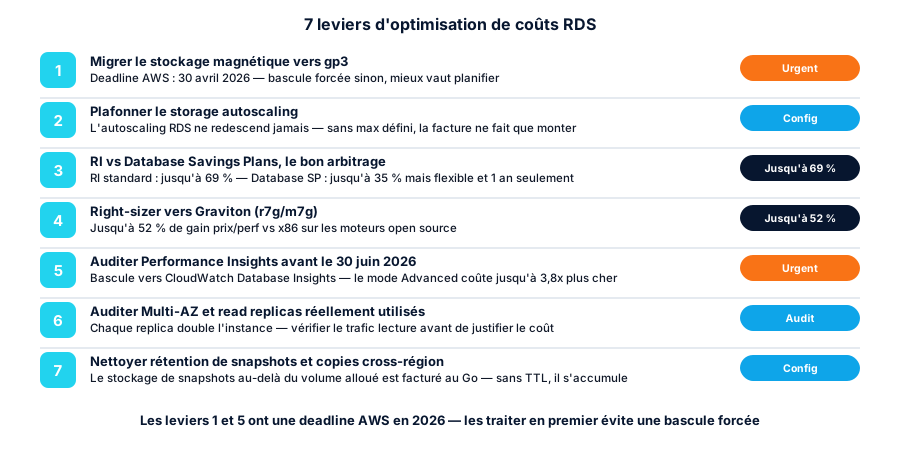
Here are the 7 levers, ordered by practical priority.
1. Migrate magnetic storage to gp3 before April 30, 2026
AWS has officially announced the deprecation of magnetic (standard) storage on RDS. The timeline is precise: after April 29, 2026, AWS starts forcibly migrating remaining magnetic volumes to gp3; starting June 1, 2026, gp3 becomes the default storage type when restoring a snapshot; starting July 1, 2026, you can no longer restore a snapshot to magnetic storage.
If you still have instances on magnetic storage (often legacy databases never migrated since creation), this is the most urgent lever — not just for the savings, but because AWS’s forced cutover will happen on their timeline, not yours.
The savings themselves are real: gp3 bills a base rate that includes 3,000 IOPS and 125 MB/s of throughput at no extra charge, while magnetic and io1/io2 bill every provisioned IOPS separately. For a database that has never needed more than 3,000 IOPS — the majority of databases — gp3 is structurally cheaper, migration deadline aside.
aws rds describe-db-instances \
  --query "DBInstances[?StorageType=='standard'].[DBInstanceIdentifier,AllocatedStorage,StorageType]" \
  --output table
The migration happens with no downtime via modify-db-instance --storage-type gp3 (a standard online storage modification).
2. Cap storage autoscaling
RDS storage autoscaling is enabled by default on most recent instances, and that’s generally good — until you discover its most important rule: it never scales back down. Growth triggers when free space drops below 10% for at least 5 minutes, in increments of 10% of current size, 5 GB, or projected 7-hour growth (whichever is largest) — but nothing ever shrinks the volume afterward, even if usage drops.
In practice, a one-off spike (a data import, a poorly-sized batch job, a schema migration) can push an instance from 100 GB to 300 GB in a few hours, and those 300 GB stay billed indefinitely even if actual usage falls back to 120 GB.
The fix is straightforward, in Terraform:
resource "aws_db_instance" "main" {
  # ...
  allocated_storage     = 100
  max_allocated_storage = 250   # hard cap — never exceeded without manual approval
}
Without max_allocated_storage set, autoscaling has no ceiling. Pair it with a CloudWatch alarm on FreeStorageSpace at 20% so you’re notified before the automatic trigger fires, rather than discovering it on next month’s bill.
3. Choose between Reserved Instances and Database Savings Plans
This is the most directly ROI-positive lever for any database running continuously — which is most production databases. Two mechanisms coexist and behave differently:
- RDS Reserved Instances: up to 69% discount over 3 years, but the commitment is locked to a specific instance family, engine, and region. Change instance generation or engine before the term ends, and the RI is stranded.
- Database Savings Plans: up to 35% discount, with more flexibility (covers multiple families), but only as 1-year, No Upfront commitments, and restricted to generation 7+ instances (
db.r7g,db.m7g).
The pattern from our audits: for a database that has been stable for over a year, with no engine change or instance-family migration on the roadmap, the standard RI stays 6 to 9 percentage points ahead. For a database still evolving architecturally (planned engine migration, unstabilized scaling), the Database Savings Plan absorbs the change without losing the commitment.
aws rds describe-reserved-db-instances-offerings \
  --db-instance-class db.r7g.xlarge \
  --duration 1y \
  --product-description postgresql \
  --query 'ReservedDBInstancesOfferings[].[FixedPrice,UsagePrice,OfferingType]' \
  --output table
Audit the instance’s actual stability over the last 90 days (CloudTrail plus modification history) before committing for 1 or 3 years.
4. Right-size onto Graviton (r7g / m7g)
On open-source engines (PostgreSQL, MySQL, MariaDB), Graviton2 delivered up to 52% better price/performance compared to equivalent Intel instances, and Graviton3 adds another 27% on top of Graviton2. This is one of the rare changes that combines a direct cost cut with a performance gain — not a trade-off.
The practical constraint: the switch requires an instance restart (or a failover for a Multi-AZ setup), so it needs a maintenance window, not the middle of a production day. Also check engine compatibility — proprietary engines (Oracle, SQL Server) don’t run on Graviton and follow a different lever (see below).
For SQL Server and Oracle, AWS introduced Optimize CPU on newer instance families (m7i, r7i, m8i, r8i): this lets you configure the number of vCPUs exposed to the OS independently of allocated memory, directly cutting Windows/SQL Server licensing costs billed per vCPU — AWS advertises up to 55% lower pricing on newer instance generations for RDS SQL Server. If you’re on license-included RDS, check this lever before any classic right-sizing pass.
5. Audit Performance Insights before June 30, 2026
The second firm deadline this year: AWS announced the end-of-life of the classic Performance Insights console and its current pricing on June 30, 2026, in favor of CloudWatch Database Insights. Standard mode carries over the same pricing as Performance Insights today for extended retention (1 to 24 months) — so no surprise if you leave it untouched.
The trap is elsewhere: Database Insights’ Advanced mode bills roughly $9.125/vCPU/month, nearly 3.8 times more expensive than Performance Insights’ old paid tier for 15-month retention on a 2-vCPU instance. If your organization defaults to Advanced during migration without checking what’s actually needed, that’s a line item that can quadruple with no additional value consumed.
Ahead of the deadline: inventory instances with extended retention enabled, verify who actually consults this data (many are enabled “just in case” and never checked), and only move to Advanced for databases where advanced performance diagnostics (cross-instance query correlation, multi-metric analysis) is a documented need — not a reflex.
6. Audit whether Multi-AZ and read replicas are actually used
Multi-AZ doubles the instance’s compute cost (a continuously synchronized standby instance). That’s justified for a production database with a real availability SLA — it isn’t for a staging environment or a low-criticality secondary database, where it’s nonetheless found enabled “by default” in a majority of audits.
Same logic for read replicas: each replica is a full-price instance. The question to ask systematically is whether read traffic is actually routed to the replica (verifiable via DatabaseConnections and application metrics) — not “we might need it someday.”
aws cloudwatch get-metric-statistics \
  --namespace AWS/RDS --metric-name DatabaseConnections \
  --dimensions Name=DBInstanceIdentifier,Value=<replica-id> \
  --start-time $(date -u -d '30 days ago' +%Y-%m-%dT%H:%M:%S) \
  --end-time $(date -u +%Y-%m-%dT%H:%M:%S) \
  --period 86400 --statistics Average
A replica averaging near-zero connections over 30 days is a direct candidate for removal.
7. Clean up snapshot retention and cross-region copies
RDS snapshots beyond the source instance’s allocated storage are billed per GB-month, indefinitely, for as long as they exist. Without an explicit retention policy, they pile up — this is especially true for manual snapshots created before a migration or test, and never cleaned up afterward.
Cross-region copies (often set up for disaster recovery) double the storage cost of the copied snapshot, in a region that’s typically more expensive (us-east-1 is the cheapest pricing baseline; eu-west-3 and other European regions typically cost more). Verify each cross-region copy answers a documented DR requirement, not a box checked by default in a generic runbook.
AWS Backup lets you define an automatic lifecycle (transition plus expiration) on snapshots — that’s the mechanism to enable rather than a periodic manual cleanup, which always ends up forgotten.
What it adds up to in practice
On a typical organization audit (10-20 RDS instances, monthly bill in the €4,000-8,000 range), stacking the 7 levers — gp3 storage, autoscaling cap, RI/Database SP, Graviton right-sizing, Performance Insights cleanup, Multi-AZ/replica audit, snapshot cleanup — typically returns 25 to 40% in recurring savings, with no impact on availability or performance. The first two levers (magnetic storage, Performance Insights) carry a firm AWS deadline in 2026: handle them before the rest, regardless of ROI, to avoid a forced migration outside your control.
Conclusion
RDS isn’t a line item you can ignore once the instance is launched. Unlike EC2, where right-sizing has become a routine FinOps habit, RDS remains under-audited — largely because touching a production database is scary, and rightly so. The good news: most of these 7 levers touch neither the engine nor the data, only the configuration around it — storage, pricing commitment, observability, replication topology.
If your RDS bill hasn’t been audited in over a year, or you still have instances on magnetic storage, let’s talk about your architecture — a typical RDS audit takes 3 to 5 days and identifies most of that 25-40% before any implementation work starts.
Found this useful? Share it.
Go further
A topic, a project, a question?
Distribuée supports demanding SMBs on cloud security, CI/CD supply chain and AI security.
Book 15 min