Cloud posture
Golden AMIs: building, distributing and enforcing hardened EC2 images in production
A complete Golden AMI pipeline: pinned base, hardening with EC2 Image Builder, publishing via SSM Parameter, and blocking every other image with SCPs, Allowed AMIs and AWS Config.
In most of the organizations I audit, the question “where does this instance’s AMI come from?” has no simple answer. A data "aws_ami" with most_recent = true and a name filter, a community AMI found in 2022 and never rebuilt, a Marketplace image whose terms nobody re-reads, three Ubuntu variants depending on the team. It runs, so nobody touches it.
The problem is that the AMI is the starting point of everything that runs on EC2. If it is poorly chosen, unpatched or modified outside any process, the rest of the chain (IAM, network, logging) is protecting a system that is already fragile. A golden AMI is the opposite: an image built by you, from a known base, hardened, tested, versioned, and the only one your accounts are allowed to launch.
This article describes the full pipeline as I set it up on engagements: what goes into the image, how to build it with EC2 Image Builder, how to distribute it, and above all how to forbid everything else. With the Terraform, the SCP and the Config rule that go with it.
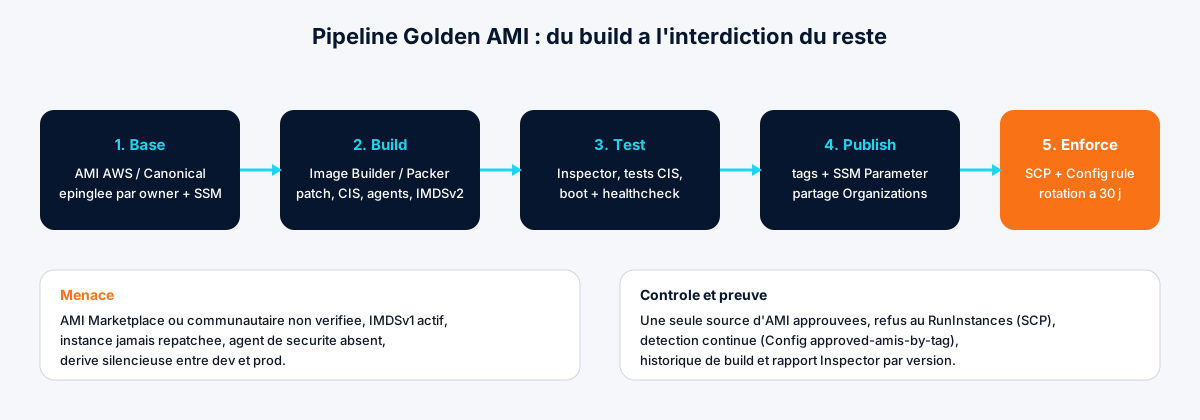
The threat: what you launch without knowing it
Three scenarios come up every time.
The “most recent” AMI that isn’t yours. In February 2025, Datadog Security Labs documented the whoAMI attack: an attacker publishes a public AMI whose name mimics an official image pattern (ubuntu/images/hvm-ssd/ubuntu-jammy-22.04-amd64-server-*). Any code that looks up an AMI by name with most_recent = true without filtering on owners picks it. Datadog found this pattern in production code, including at AWS. An instance launched from that AMI runs whatever the attacker put in it, with the instance’s IAM role.
The instance that is never rebuilt. A 2023 AMI patched “by hand” via SSM Patch Manager is still a 2023 AMI at the next autoscaling event: the new instance boots with the original CVEs, then patches itself, if patching still works. Every scale-out is an exposure window.
Silent drift. Without a common image, the CloudWatch agent is present in prod but not in staging, IMDSv2 is enforced on instances created via the launch template but not on those created from the console, the SSM agent is missing on the one instance that matters. On incident day, you discover that the affected instance was covered by no tool at all.
The control against all three is the same: a single source of approved AMIs, rebuilt regularly, and a technical refusal of everything else.
What a golden AMI must contain
The content varies by context, but the baseline is stable. For an organization on Amazon Linux 2023 or Ubuntu LTS:
| Element | Why | How to prove it |
|---|---|---|
| Base pinned by owner (AWS, Canonical) and resolved via SSM public parameter | Eliminate name confusion | Explicit owners in code, no most_recent on a name |
| All patches at build time | New instance = 0 known CVEs at boot | Inspector report per AMI version |
| CIS Level 1 or STIG hardening | Defensible default configuration in an audit | Image Builder test component + report |
IMDSv2 required (ImdsSupport = v2.0) | Block credential theft via SSRF | aws ec2 describe-images shows ImdsSupport: v2.0 |
| SSM, CloudWatch agents, possibly EDR | Observability and patching guaranteed from the first second | SSM inventory at 100% |
| Root volume encrypted with a CMK | Compliance, control over who can read snapshots | describe-images → Encrypted: true, KmsKeyId |
| No secrets, SSH keys, default users | The image will end up shared or copied | Filesystem scan at build |
Tags GoldenAmi=true, Version, BuildDate, Source | Tag-based enforcement and traceability | Config rule approved-amis-by-tag |
| Deprecation date at D+30 | Force rotation | describe-images → DeprecationTime |
What you don’t put in it: application code. The golden AMI is a system layer. The application arrives through deployment (container, artefact, user data); otherwise you rebuild an image at every release and the pipeline becomes a bottleneck.
Building with EC2 Image Builder
EC2 Image Builder is free (you pay for the build instance and storage), integrates with Organizations for distribution, and provides useful AWS-managed components: update-linux, amazon-cloudwatch-agent-linux, stig-build-linux-medium, inspector-test-linux. Packer does the job very well too; Image Builder has the advantage of not requiring a CI runner with broad EC2 permissions.
The pipeline in Terraform, reduced to the essentials. Dedicated shared-services account (here 111122223333), region eu-west-3.
locals {
  org_arn      = "arn:aws:organizations::111122223333:organization/o-exampleorg"
  parent_image = "arn:aws:imagebuilder:eu-west-3:aws:image/amazon-linux-2023-x86/x.x.x"
}

# Custom component: additional hardening + checks
resource "aws_imagebuilder_component" "hardening" {
  name     = "org-hardening"
  platform = "Linux"
  version  = "1.3.0"
  data = yamlencode({
    schemaVersion = 1.0
    phases = [
      {
        name = "build"
        steps = [
          {
            name   = "DisablePasswordAuth"
            action = "ExecuteBash"
            inputs = { commands = [
              "sed -i 's/^#\\?PasswordAuthentication.*/PasswordAuthentication no/' /etc/ssh/sshd_config",
              "sed -i 's/^#\\?PermitRootLogin.*/PermitRootLogin no/' /etc/ssh/sshd_config",
            ] }
          },
          {
            name   = "RemoveDefaultKeysAndHistory"
            action = "ExecuteBash"
            inputs = { commands = [
              "rm -f /home/*/.ssh/authorized_keys /root/.ssh/authorized_keys",
              "find / -name '.bash_history' -delete 2>/dev/null || true",
              "rm -f /etc/machine-id && touch /etc/machine-id",
            ] }
          },
        ]
      },
      {
        name = "validate"
        steps = [{
          name   = "NoSecretsOnDisk"
          action = "ExecuteBash"
          inputs = { commands = [
            "! grep -rIE 'AKIA[0-9A-Z]{16}|-----BEGIN (RSA|OPENSSH) PRIVATE KEY' /etc /home /root /opt 2>/dev/null",
          ] }
        }]
      },
      {
        name = "test"
        steps = [{
          name   = "SshHardened"
          action = "ExecuteBash"
          inputs = { commands = [
            "sshd -T | grep -q 'passwordauthentication no'",
            "sshd -T | grep -q 'permitrootlogin no'",
          ] }
        }]
      },
    ]
  })
}

resource "aws_imagebuilder_image_recipe" "golden" {
  name         = "golden-al2023"
  version      = "1.3.0"
  parent_image = local.parent_image

  block_device_mapping {
    device_name = "/dev/xvda"
    ebs {
      volume_size           = 20
      volume_type           = "gp3"
      encrypted             = true
      kms_key_id            = aws_kms_key.ami.arn
      delete_on_termination = true
    }
  }

  # AWS-managed components, pinned by version in real life
  component { component_arn = "arn:aws:imagebuilder:eu-west-3:aws:component/update-linux/x.x.x" }
  component { component_arn = "arn:aws:imagebuilder:eu-west-3:aws:component/stig-build-linux-medium/x.x.x" }
  component { component_arn = "arn:aws:imagebuilder:eu-west-3:aws:component/amazon-cloudwatch-agent-linux/x.x.x" }
  component { component_arn = aws_imagebuilder_component.hardening.arn }
  component { component_arn = "arn:aws:imagebuilder:eu-west-3:aws:component/inspector-test-linux/x.x.x" }

  systems_manager_agent { uninstall_after_build = false }
}

resource "aws_imagebuilder_infrastructure_configuration" "build" {
  name                          = "golden-build"
  instance_profile_name         = aws_iam_instance_profile.imagebuilder.name
  instance_types                = ["t3.medium"]
  subnet_id                     = var.build_subnet_id
  security_group_ids            = [aws_security_group.build_egress_only.id]
  terminate_instance_on_failure = true

  instance_metadata_options {
    http_tokens                 = "required"
    http_put_response_hop_limit = 1
  }

  logging {
    s3_logs {
      s3_bucket_name = aws_s3_bucket.imagebuilder_logs.id
      s3_key_prefix  = "golden-al2023"
    }
  }
}

resource "aws_imagebuilder_distribution_configuration" "golden" {
  name = "golden-al2023-dist"

  distribution {
    region = "eu-west-3"

    ami_distribution_configuration {
      name       = "golden-al2023-{{ imagebuilder:buildDate }}"
      kms_key_id = aws_kms_key.ami.arn
      ami_tags = {
        GoldenAmi = "true"
        Source    = "imagebuilder/golden-al2023"
        Version   = "1.3.0"
        BuildDate = "{{ imagebuilder:buildDate }}"
      }
      launch_permission {
        organization_arns = [local.org_arn]
      }
    }

    # The current AMI is exposed to consumers through an SSM parameter
    ssm_parameter_configuration {
      parameter_name = "/golden/al2023/x86_64/latest"
      data_type      = "aws:ec2:image"
    }
  }
}

resource "aws_imagebuilder_image_pipeline" "golden" {
  name                             = "golden-al2023"
  image_recipe_arn                 = aws_imagebuilder_image_recipe.golden.arn
  infrastructure_configuration_arn = aws_imagebuilder_infrastructure_configuration.build.arn
  distribution_configuration_arn   = aws_imagebuilder_distribution_configuration.golden.arn
  enhanced_image_metadata_enabled  = true

  image_tests_configuration {
    image_tests_enabled = true
    timeout_minutes     = 60
  }

  schedule {
    # Every Monday 03:00 UTC, only if a dependency changed (base image or component)
    schedule_expression                = "cron(0 3 ? * MON *)"
    pipeline_execution_start_condition = "EXPRESSION_MATCH_AND_DEPENDENCY_UPDATES_AVAILABLE"
  }
}
Three points that make the difference in an audit:
launch_permission.organization_arnsshares the AMI with the whole organisation without ever making it public. An accidentally public AMI is a reportable incident.ssm_parameter_configurationupdates/golden/al2023/x86_64/latestat every build. Consumers no longer have hard-coded AMI IDs.inspector-test-linuxruns Amazon Inspector on the build image. If critical findings come out, the pipeline fails and the AMI is not distributed. That’s the “0 critical CVEs at build” evidence you’ll show the auditor.
One last step Terraform doesn’t cover cleanly yet: enforcing IMDSv2 at the image level, so that even a hand-created instance inherits the right setting.
AMI_ID=$(aws ssm get-parameter --name /golden/al2023/x86_64/latest --query Parameter.Value --output text)
aws ec2 modify-image-attribute --image-id "$AMI_ID" --imds-support v2.0
aws ec2 enable-image-deprecation --image-id "$AMI_ID" \
  --deprecate-at "$(date -u -d '+30 days' +%Y-%m-%dT%H:%M:%SZ)"
These two commands live in a Lambda triggered by the EventBridge event EC2 Image Builder Image State Change (state AVAILABLE). The AMI deprecates itself 30 days after creation: it disappears from default describe-images results, which cleanly breaks any code that doesn’t follow the SSM parameter.
Consuming: never a hard-coded AMI ID
On the team side, the rule is simple: the AMI comes from the SSM parameter, full stop.
data "aws_ssm_parameter" "golden" {
  name = "/golden/al2023/x86_64/latest"
}

resource "aws_launch_template" "app" {
  name_prefix = "app-"
  image_id    = data.aws_ssm_parameter.golden.value

  metadata_options {
    http_tokens                 = "required"
    http_put_response_hop_limit = 1
  }

  update_default_version = true
}

resource "aws_autoscaling_group" "app" {
  # ...
  launch_template {
    id      = aws_launch_template.app.id
    version = "$Latest"
  }

  instance_refresh {
    strategy = "Rolling"
    preferences { min_healthy_percentage = 90 }
  }
}
Launch templates also accept image_id = "resolve:ssm:/golden/al2023/x86_64/latest" directly: the ID is resolved at launch, without terraform apply. Handy for ASGs, less so for traceability (the Terraform plan no longer shows the AMI change). I prefer the first form in prod, the second in dev.
With instance_refresh, each new golden AMI triggers a rolling replacement of the ASG’s instances at the next apply. That’s what turns “we have a new image” into “the fleet is up to date”.
Enforcing: refuse anything that isn’t golden
Building a golden AMI without forbidding the others is writing a policy nobody reads. Three complementary mechanisms.
1. SCP: deny at RunInstances
An SCP on the Workloads OU denies launching any instance whose image is not owned by the shared-services account. The ec2:Owner condition applies to the image resource.
{
  "Version": "2012-10-17",
  "Statement": [
    {
      "Sid": "OnlyGoldenAmis",
      "Effect": "Deny",
      "Action": "ec2:RunInstances",
      "Resource": "arn:aws:ec2:*::image/ami-*",
      "Condition": {
        "StringNotEquals": {
          "ec2:Owner": "111122223333"
        }
      }
    }
  ]
}
Result: RunInstances with a community, Marketplace or hand-built AMI in the account fails with UnauthorizedOperation. Legitimate Marketplace appliances (a firewall, a vendor bastion) are handled as exceptions: there is no second Allow statement in an SCP, so either you place them in a dedicated OU without this SCP, or you add their owner to the ec2:Owner list. Document every exception; the auditor will ask for the list.
2. Allowed AMIs: the native EC2 guardrail
Since late 2024, EC2 offers an account-level Allowed AMIs setting that restricts discovery and launch to images from approved providers (amazon, aws-marketplace, aws-backup-vault or account IDs). It has an audit mode that blocks nothing but flags non-compliant AMIs in describe-images (ImageAllowed: false), so you can measure the impact before enabling it.
# Phase 1: measure
aws ec2 enable-allowed-images-settings --allowed-images-settings-state audit-mode
aws ec2 replace-image-criteria-in-allowed-images-settings \
  --image-criteria "ImageProviders=111122223333"

# What it would block today
aws ec2 describe-instances \
  --query "Reservations[].Instances[].[InstanceId,ImageId]" --output text \
  | while read id ami; do
      allowed=$(aws ec2 describe-images --image-ids "$ami" \
        --query "Images[0].ImageAllowed" --output text 2>/dev/null)
      [ "$allowed" = "False" ] && echo "NON-COMPLIANT $id $ami"
    done

# Phase 2: block
aws ec2 enable-allowed-images-settings --allowed-images-settings-state enabled
The setting is per account and per region. To roll it out across the organisation in one go, it goes through Organizations declarative policies (type EC2), which cover precisely this setting. It’s more readable than an SCP and can’t be bypassed through a forgotten API path.
3. AWS Config: detect drift
The SCP blocks the future. Config finds the present: instances launched before the rule, or in an account outside the OU.
resource "aws_config_config_rule" "approved_amis" {
  name = "approved-amis-by-tag"
  source {
    owner             = "AWS"
    source_identifier = "APPROVED_AMIS_BY_TAG"
  }
  input_parameters = jsonencode({ amisByTagKeyAndValue = "GoldenAmi:true" })
}

resource "aws_config_config_rule" "imdsv2" {
  name = "ec2-imdsv2-check"
  source {
    owner             = "AWS"
    source_identifier = "EC2_IMDSV2_CHECK"
  }
}
Deployed as an organization conformance pack from the audit account, these two rules give a per-account dashboard: how many instances run on something other than a golden AMI, how many still accept IMDSv1. That’s the engagement’s starting number, and the one you drive to zero.
Evidence for the auditor
This pipeline produces, with no extra effort, what a SOC2 or ISO 27001 auditor or an enterprise customer asks for:
- Provenance: Image Builder logs in S3, recipe and components versioned in Git,
SourceandBuildDatein every AMI’s tags. - Vulnerabilities: Inspector report per build, pipeline failure on critical finding, Inspector findings on running instances correlated with the AMI version.
- Hardening: STIG or CIS component applied and tested, settings verified in the
testphase. - Enforcement: versioned SCP, Allowed AMIs setting
enabled, Config compliance at 100% or a named list of exceptions. - Rotation:
DeprecationTimeon every AMI, no instance with an AMI older than 30 to 45 days (Config Advanced Query onimageId×creationDate).
What makes the difference in an audit isn’t having a golden AMI. It’s being able to show that launching any other one is impossible, and proving it with today’s data rather than a policy document.
Conclusion
The golden AMI is one of the few controls that improves security (reduced surface, guaranteed patches, IMDSv2 everywhere), operability (one image to know, agents always present) and compliance (evidence generated by the pipeline) at the same time. The cost is low: a t3.medium for a few minutes a week, a shared account, three more Terraform resources. The real work is in enforcement, because that’s what exposes the exceptions and forces you to document them.
If your instances run today on AMIs whose provenance nobody knows, or if your code still contains a most_recent = true without owners, it’s one of the first things we look at in a Cloud Security Audit: the inventory of images in production takes an hour and gives a very precise picture of the real posture.
Found this useful? Share it.
Go further
A topic, a project, a question?
Distribuée supports demanding SMBs on cloud security, CI/CD supply chain and AI security.
Book 15 min