FinOps
FinOps: where your AWS costs are really hiding
The most underestimated AWS cost lines for organizations — data transfer, NAT Gateway, CloudWatch, orphan resources. With CLI commands to hunt them down.
When you look at an AWS bill for the first time, the reflex is to attack EC2 and RDS. They’re visible, big, well-known. The problem: between 30 and 50 % of an organization’s AWS bill hides in side lines — invisible in monthly reviews, never discussed in architecture reviews, and yet largely eliminable.
This article inventories the lines we systematically find on Distribuée engagements, and gives the AWS CLI commands to hunt them.
The actual breakdown of a bill
Across ~150 cumulative audits on organizations between $5K and $100K/month, here’s the typical breakdown we observe:
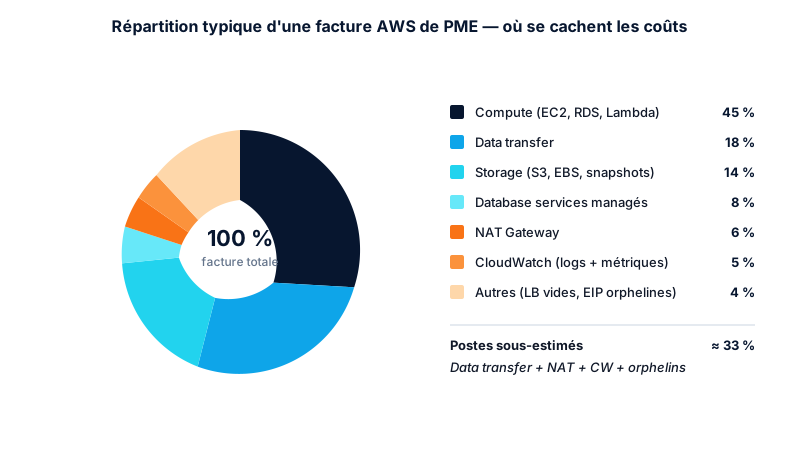
The orange lines (data transfer, NAT, CloudWatch, orphan resources) make up a third of the bill. That’s where you recover the most, the fastest.
Line 1 — Data transfer, the invisible champion
Data transfer bills every time a byte leaves an AZ, a VPC, a region, or the Internet. Most architectures have never been optimized on this axis because nothing visibly breaks.
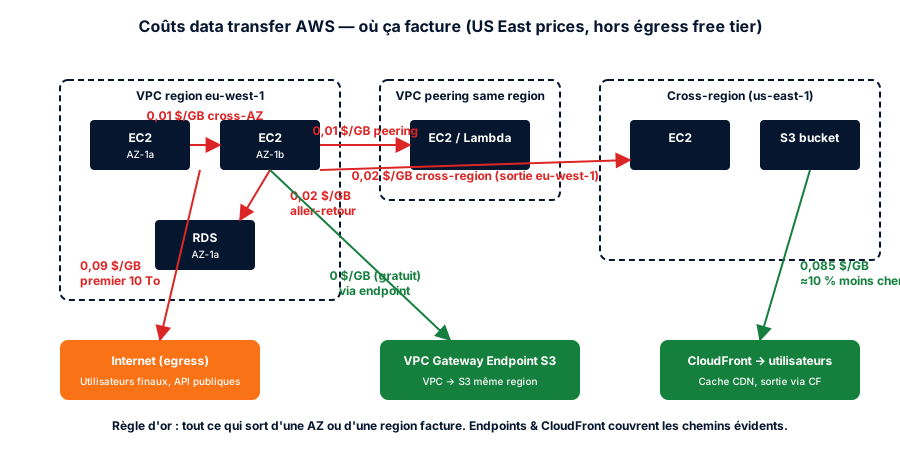
The most common paths to fix:
EC2 → S3 without VPC endpoint: routes through NAT Gateway → Internet → S3. Billed twice (NAT + egress). With a Gateway Endpoint, free.
EC2 → RDS cross-AZ: $0.01/GB outbound, $0.01/GB inbound. On a chatty SQL app, it’s massive. Fix: Multi-AZ for resilience, but read preferentially from the same-AZ replica.
Inter-region: $0.02/GB. Often a leftover from multi-region setups that no longer make sense. Simple question: do you really need that secondary region?
To map your situation:
# Top data transfer costs last month, by usage type
aws ce get-cost-and-usage \
  --time-period Start=$(date -v-1m +%Y-%m-01),End=$(date +%Y-%m-01) \
  --granularity MONTHLY \
  --metrics UnblendedCost \
  --group-by Type=DIMENSION,Key=USAGE_TYPE \
  --filter '{"Dimensions":{"Key":"USAGE_TYPE_GROUP","Values":["EC2: Data Transfer"]}}' \
  --query 'ResultsByTime[].Groups[?Metrics.UnblendedCost.Amount>`50`].[Keys[0],Metrics.UnblendedCost.Amount]' \
  --output table
Line 2 — NAT Gateway, the silent killer
A NAT Gateway costs $0.045/hr baseline + $0.045/GB processed. On a VPC pushing 1 TB/month to the Internet, that’s $45 + $32 (hours) = ~$77/month per NAT, per AZ.
With 3 AZs × 3 environments × 2 regions, it climbs to several thousand dollars/year for nothing.
Fixes by yield:
- VPC Gateway Endpoints for S3 and DynamoDB (free): eliminate ~40 % of typical NAT traffic
- VPC Interface Endpoints for AWS services (~$7/month per endpoint, often worth it): ECR, Secrets Manager, SSM, STS
- Single NAT per environment when cross-AZ resilience isn’t critical
- NAT Instances for non-prod (~$5/month)
# List NAT Gateways and their estimated monthly cost
aws ec2 describe-nat-gateways \
  --filter "Name=state,Values=available" \
  --query 'NatGateways[].[NatGatewayId,SubnetId,Tags[?Key==`Name`].Value | [0]]' \
  --output table
Line 3 — CloudWatch Logs, the silent debt
CloudWatch bills on three axes:
- Ingestion: $0.50/GB
- Storage: $0.03/GB/month
- Insights queries: $0.005/GB scanned
On verbose workloads (Lambda in debug, ALB access logs without retention), we routinely see $200–$800/month in CloudWatch — most of it logs nobody ever reads.
Fixes:
- Default retention, not “Never expire”: 30 days for prod, 7 for staging, 1 for dev
- Lambda ingestion filters: drop DEBUG in prod
- Subscription filter to S3 for long-term logs: 25× cheaper than CloudWatch
- Athena over S3 logs instead of Logs Insights for ad-hoc analyses
# Find log groups without retention configured
aws logs describe-log-groups \
  --query 'logGroups[?retentionInDays==`null`].[logGroupName,storedBytes]' \
  --output table

# Set 30-day retention on all log groups under a prefix
aws logs describe-log-groups \
  --log-group-name-prefix "/aws/lambda/" \
  --query 'logGroups[?retentionInDays==`null`].logGroupName' \
  --output text | xargs -n1 -I{} aws logs put-retention-policy \
  --log-group-name {} --retention-in-days 30
Line 4 — Orphan resources
The “ghosts” that cost a little each but accumulate. On an account that hasn’t been cleaned in 2 years, we routinely recover $200–$600/month.
Orphan EBS snapshots
Each snapshot costs $0.05/GB/month. Snapshots of long-deleted volumes are the #1 source of waste.
# Snapshots whose source volume no longer exists
aws ec2 describe-snapshots --owner-ids self \
  --query 'Snapshots[?VolumeSize>`0`].[SnapshotId,VolumeId,VolumeSize,StartTime]' \
  --output text | while read snap_id vol_id size date; do
    if ! aws ec2 describe-volumes --volume-ids "$vol_id" >/dev/null 2>&1; then
      echo "ORPHAN: $snap_id ($size GB, created $date)"
    fi
  done
For snapshots you must keep (compliance, long retention) but rarely access, the EBS Snapshots Archive tier ($0.0125/GB/month, 90-day minimum retention) costs 75% less than standard storage.
Unattached Elastic IPs
$0.005/hr, or $3.60/month per idle EIP. On an account with 30 ghost EIPs, that’s $100/month.
Since February 1, 2024, this charge is no longer limited to orphan EIPs: all public IPv4 addresses on the account are billed at $0.005/hr, attached or not, with 750 free hours per month per account for addresses in use. A single EIP attached continuously stays covered by that allowance, but once you stack several (multiple ENIs, per-instance public IPs, several load balancers), the meter also runs on attached addresses — not just on ghosts.
aws ec2 describe-addresses \
  --query 'Addresses[?AssociationId==`null`].[PublicIp,AllocationId]' \
  --output table
Empty Load Balancers
An ALB runs at ~$18/month minimum whether it has traffic or not. When you decommission an environment and forget the LB…
# ALBs without healthy target group
aws elbv2 describe-load-balancers \
  --query 'LoadBalancers[].[LoadBalancerArn,LoadBalancerName,State.Code]' \
  --output text | while read arn name state; do
    targets=$(aws elbv2 describe-target-groups \
      --load-balancer-arn "$arn" \
      --query 'length(TargetGroups)' --output text)
    if [ "$targets" = "0" ]; then
      echo "EMPTY ALB: $name"
    fi
  done
Detached EBS volumes
A detached EBS volume costs the same as an attached one. The classic oversight after a migration.
aws ec2 describe-volumes \
  --filters Name=status,Values=available \
  --query 'Volumes[].[VolumeId,Size,VolumeType,CreateTime]' \
  --output table
Line 5 — Mis-sized databases
Not really “hidden”, but often ignored. RDS and OpenSearch aren’t covered by Compute Optimizer in every configuration. Over-provisioning is common. Since 2024, Compute Optimizer covers RDS rightsizing for MySQL, PostgreSQL and Aurora (with about thirty more instance classes added in 2026) — but OpenSearch and commercial engines (SQL Server, Oracle) remain out of scope.
Questions to ask:
- Is prod running Multi-AZ when the workload isn’t critical?
- Is RDS storage on GP3 (20 % cheaper than GP2)?
- Are manual snapshots older than 12 months?
- Is automated backup retention set to 35 days when 7 would do?
The monthly hunting drill
Everything above must become a routine, not a one-off audit. Our monthly hunting script, run automatically (Lambda + Slack):
| Check | Frequency | Alert threshold |
|---|---|---|
| EBS snapshots without parent volume | Weekly | > $50 accumulated |
| Unattached EIPs | Weekly | > 5 EIPs |
available EBS volumes | Weekly | > 100 GB total |
| ALBs without healthy targets | Monthly | > 0 |
| Log groups without retention | Monthly | > 10 groups |
| NAT Gateway processing > X GB | Monthly | > 500 GB without S3 endpoint |
| EC2 over-provisioned (Compute Optimizer) | Monthly | savings > $100/month |
That’s day-to-day FinOps. Not one big yearly operation. A continuous, automated, alerted discipline.
Conclusion
Compute is visible, the rest is sneaky. On most AWS accounts we audit, the “hidden” lines alone equal 1 to 3 junior engineers’ yearly salary. That money isn’t lost to AWS — it’s in your bill.
On a real account, these levers cut NAT traffic from 4.2 TB to 1.6 TB/month, reduced CloudWatch logs by two thirds, and removed 280 orphan resources.
If you want a full bill audit, with a costed and prioritized 30/60/90-day action plan, that’s exactly what we do on the Architecture & DevSecOps Audit engagement.
Article reviewed and updated on 2026-09-15.
Found this useful? Share it.
Go further
A topic, a project, a question?
Distribuée supports demanding SMBs on cloud security, CI/CD supply chain and AI security.
Book 15 min