FinOps
Cutting your AWS bill without breaking your architecture: practical methods
Proven FinOps methods to recover 30-50% of an organization's AWS bill without introducing operational risk.
When an organization discovers its AWS bill above $10K/month, the first reaction is almost always the same: “we need to cut something”. And the second one, right after: “but we don’t know where to start without breaking everything”.
That’s the right reflex. Poorly piloted FinOps creates more cost than it removes — a 3am downtime, a botched migration, a data loss. This article walks through the sequence we apply on Distribuée engagements to recover 30 to 50 % of an AWS bill without introducing operational risk.
Before any lever: mapping is non-negotiable
No FinOps without consistent tagging. If your costs aren’t attributable to a team, a product, an environment, you’re optimizing blind.
Our minimum baseline:
| Tag | Example | Required on |
|---|---|---|
Environment | prod, staging, dev | Every resource |
Owner | team-payments | Every resource |
Project | checkout-api | Every resource |
CostCenter | R&D, Operations | Differently-billed accounts |
Once tags are activated in Billing > Cost allocation tags (24-hour delay before they show up), Cost Explorer reveals where the money actually goes. Only then do we start cutting.
Lever 1 — Reserved Instances and Savings Plans
This is the highest-yield, fastest-to-deploy lever, no code changes. You trade a commitment (1 or 3 years) for a discount on the hourly rate.
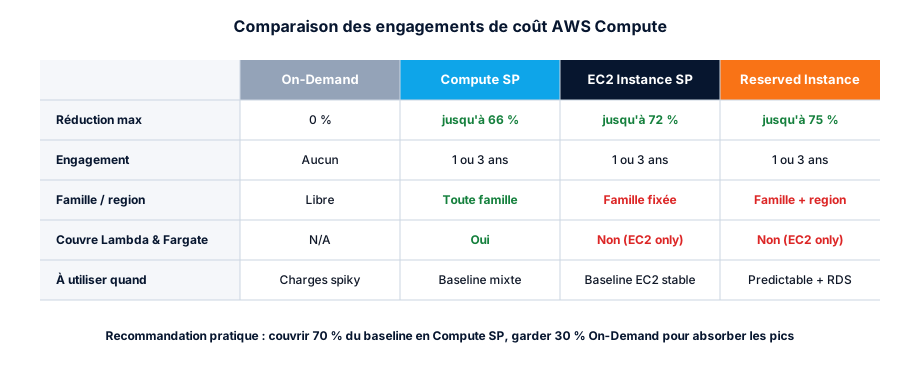
In practice, on a stable EC2/RDS baseline, 70 % coverage with Compute Savings Plans is the ratio we recommend. The remaining 30 % stay On-Demand to absorb spikes and experiments.
The math fits in one CLI call:
# Average monthly EC2 + Lambda + Fargate spend
aws ce get-cost-and-usage \
  --time-period Start=2026-01-01,End=2026-04-01 \
  --granularity MONTHLY \
  --metrics UnblendedCost \
  --filter '{"Dimensions":{"Key":"SERVICE","Values":["Amazon Elastic Compute Cloud - Compute","AWS Lambda","Amazon Elastic Container Service"]}}' \
  --query 'ResultsByTime[].Total.UnblendedCost.Amount'
Multiply the average by 0.7, that’s your Compute SP target. AWS even pre-computes a recommendation in Cost Explorer > Savings Plans > Recommendations — verify it, don’t apply blind.
Caveat: a Savings Plan is non-refundable. If you tear down the underlying workload, you keep paying. Don’t cover a workload you expect to disappear within 12 months.
Lever 2 — Right-sizing with AWS Compute Optimizer
Most EC2 instances we audit are over-provisioned by a factor of 2 to 4. Compute Optimizer (free) analyzes 14 days of CloudWatch metrics and gives quantified recommendations.
# Activate Compute Optimizer
aws compute-optimizer update-enrollment-status --status Active

# Pull EC2 recommendations with estimated savings
aws compute-optimizer get-ec2-instance-recommendations \
  --query 'instanceRecommendations[?finding==`Overprovisioned`].[instanceArn,currentInstanceType,recommendationOptions[0].instanceType,recommendationOptions[0].savingsOpportunity.savingsOpportunityPercentage]' \
  --output table
Remediation pattern: start with the most expensive and most over-provisioned instances, test in staging, push to prod during a maintenance window, measure for 7 days, then move to the next one.
Lever 3 — S3 lifecycle policies
S3 Standard at $0.023/GB is fine for hot data. For everything else, colder tiers cost 5–25× less. A well-defined lifecycle policy moves data automatically.
resource "aws_s3_bucket_lifecycle_configuration" "logs" {
  bucket = aws_s3_bucket.logs.id

  rule {
    id     = "tier-old-logs"
    status = "Enabled"

    transition {
      days          = 30
      storage_class = "STANDARD_IA"
    }

    transition {
      days          = 90
      storage_class = "GLACIER_IR"
    }

    transition {
      days          = 365
      storage_class = "DEEP_ARCHIVE"
    }

    expiration {
      days = 2555  # 7 years for SOC2 / GDPR
    }
  }
}
On log or backup buckets above 1 TB, we consistently see 60–80 % savings on the storage line.
Lever 4 — Cut avoidable data transfer
Data transfer is the most underestimated AWS cost line. Our dedicated article on hidden costs details the paths that bill. The two highest-yield fixes:
- VPC Gateway Endpoints for S3 and DynamoDB: free, eliminate 100 % of NAT/Internet traffic to these services. Add them to every VPC, everywhere.
- Workload colocation: if your EC2 app talks to RDS, keep them in the same AZ. Cross-AZ = $0.01/GB outbound, $0.01/GB inbound.
resource "aws_vpc_endpoint" "s3" {
  vpc_id            = aws_vpc.main.id
  service_name      = "com.amazonaws.${var.region}.s3"
  vpc_endpoint_type = "Gateway"
  route_table_ids   = aws_route_table.private[*].id
}
Lever 5 — Scheduling non-prod workloads
Dev and staging environments rarely run nights and weekends. At 168 hours/week, killing 110 (weekends + nights) divides their cost by 3.
Simple pattern with EventBridge + Lambda:
resource "aws_cloudwatch_event_rule" "stop_dev" {
  name                = "stop-dev-instances"
  description         = "Stop dev instances every weekday at 8pm"
  schedule_expression = "cron(0 20 ? * MON-FRI *)"
}

resource "aws_cloudwatch_event_target" "stop_dev" {
  rule      = aws_cloudwatch_event_rule.stop_dev.name
  target_id = "StopDevInstances"
  arn       = aws_lambda_function.stop_instances.arn
  input     = jsonencode({ environment = "dev" })
}
The Lambda itself is trivial: 20 lines of Python that filter instances by tag Environment=dev and call stop_instances().
How to avoid breaking anything
This is the most important part. The levers above work only if you maintain execution discipline:
- Test in staging first, no exceptions. Including for an instance type change.
- One optimization at a time. If you ship a Savings Plan + a right-sizing + a lifecycle policy on the same day and a cost moves, you won’t know who did what.
- Documented maintenance window, even if you think it’s transparent. An AZ failover during a deploy is a downtime.
- Measure for 7 days before moving to the next one. Workloads have weekly cycles.
- Documented rollback, scripted whenever possible.
The stacked outcome
On a $10,000/month bill, here’s the typical cumulative-savings profile from these levers, without any application behavior change:
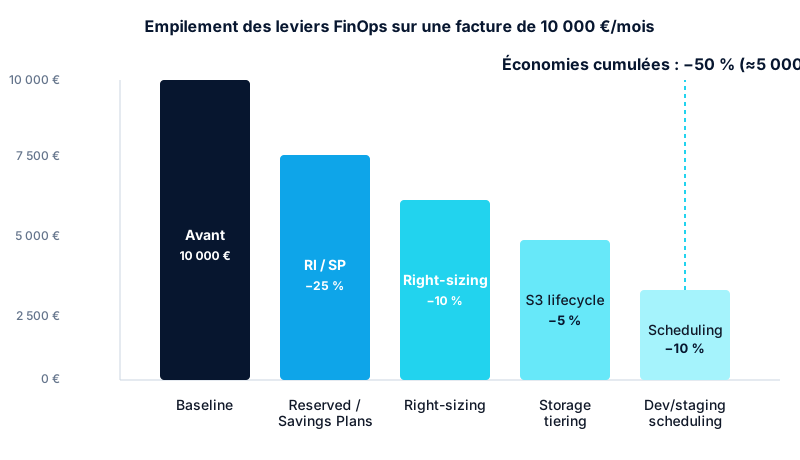
Fifty percent. On a scaling organization, that’s a senior engineer’s salary every month. And the architecture didn’t move an inch.
Conclusion
FinOps isn’t black magic, nor a question of fancy tools. It’s a disciplined sequence: map, prioritize, test, measure. The levers are public and documented. What’s monetizable is the execution rigor and knowing the traps.
This exact sequence, run on a 50-person SaaS platform, took the bill from €18K to €10.4K/month in 12 weeks.
If your AWS bill is over $10K/month and you haven’t done a FinOps audit in over a year, there are very likely $2K–$5K of waste hiding in your account every month. Let’s start an audit.
Found this useful? Share it.
Go further
A topic, a project, a question?
Distribuée supports demanding SMBs on cloud security, CI/CD supply chain and AI security.
Book 15 min