Architecture
AWS multi-account: 5 critical mistakes to avoid in 2026
The most expensive anti-patterns in AWS multi-account architecture, and how to avoid them with a minimal Landing Zone.
AWS multi-account is now standard. Isolating blast radius, separating environments, simplifying billing, delegating team autonomy: on paper, everyone agrees.
In practice, most organizations we audit have multiplied accounts without multiplying rigor. The result: operational debt that slows every release, complicates every audit, and is expensive to fix later.
This article lists the five critical mistakes we see most often — and the minimal pattern that avoids them.
The reference pattern
Before the anti-patterns, the target. A well-built AWS Organizations Landing Zone looks like this:
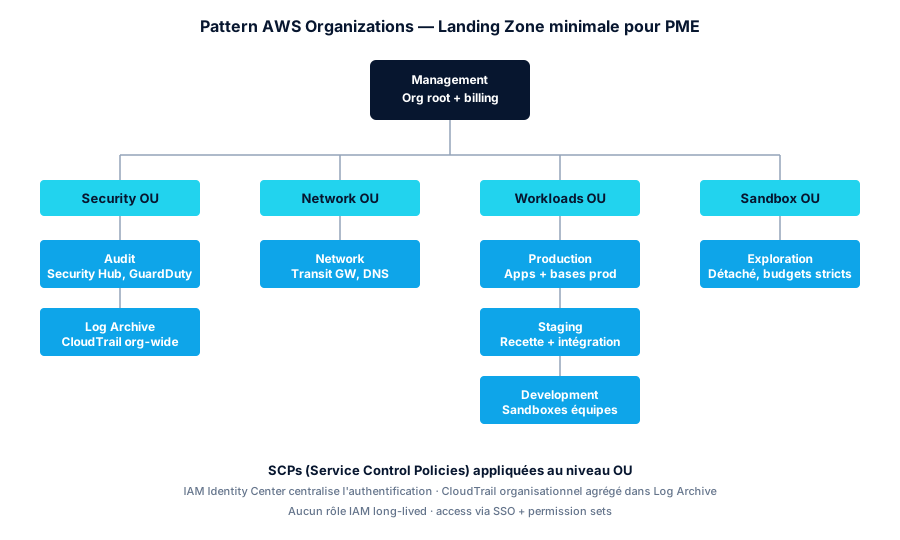
Four Organizational Units (OUs), at a minimum. Each with a clear responsibility. Service Control Policies (SCPs) applied at OU level, not per account. Authentication centralized via IAM Identity Center. Logs aggregated in a dedicated long-retention, immutable account.
That’s where we systematically pull our remediation engagements. Now the things that get in the way.
Mistake 1 — No Landing Zone
Symptom: every new account is created by hand, in the console, by a different person. Consequence: no two accounts share the same CloudTrail config, network, or guardrails.
At 3 accounts, manageable. At 10, unmanageable. At 20, a critical operational risk.
Fix: AWS Control Tower (managed) or a custom Terraform Landing Zone. Control Tower does 80 % of the work for you: OU structure, CloudTrail/Config baseline, IAM Identity Center blueprints, baseline SCP guardrails. If you’re starting today, that’s the default choice.
# Bootstrap an Org via Terraform (run from the management account)
resource "aws_organizations_organization" "main" {
  feature_set = "ALL"

  enabled_policy_types = [
    "SERVICE_CONTROL_POLICY",
    "TAG_POLICY",
    "BACKUP_POLICY"
  ]

  aws_service_access_principals = [
    "cloudtrail.amazonaws.com",
    "config.amazonaws.com",
    "guardduty.amazonaws.com",
    "securityhub.amazonaws.com",
    "sso.amazonaws.com"
  ]
}

resource "aws_organizations_organizational_unit" "security" {
  name      = "Security"
  parent_id = aws_organizations_organization.main.roots[0].id
}

resource "aws_organizations_organizational_unit" "workloads" {
  name      = "Workloads"
  parent_id = aws_organizations_organization.main.roots[0].id
}
Mistake 2 — Anarchic cross-account IAM
Symptom: dozens of cross-account sts:AssumeRole IAM roles, created on demand. Nobody knows who can do what, where.
It’s the first thing that jumps out at any internal or pre-SOC2 audit. And it’s the first thing an attacker looks for after an initial compromise: a pivot path via an over-permissive assumable role.
Fix: AWS IAM Identity Center (formerly AWS SSO). Single entry point, versioned permission sets, SAML/OIDC federation with your existing IdP (Okta, Google Workspace, Entra ID).
Once Identity Center is enabled at the organization level:
resource "aws_ssoadmin_permission_set" "developer" {
  name             = "DeveloperAccess"
  instance_arn     = local.identity_center_arn
  session_duration = "PT8H"
}

resource "aws_ssoadmin_managed_policy_attachment" "developer_powers" {
  instance_arn       = local.identity_center_arn
  managed_policy_arn = "arn:aws:iam::aws:policy/PowerUserAccess"
  permission_set_arn = aws_ssoadmin_permission_set.developer.arn
}

# Assign to a target account for an IdP group
resource "aws_ssoadmin_account_assignment" "dev_to_staging" {
  instance_arn       = local.identity_center_arn
  permission_set_arn = aws_ssoadmin_permission_set.developer.arn
  principal_id       = data.aws_identitystore_group.developers.group_id
  principal_type     = "GROUP"
  target_id          = local.staging_account_id
  target_type        = "AWS_ACCOUNT"
}
No more long-lived IAM roles. No more access keys lying around. Time-bound sessions. Every access traced in CloudTrail.
Mistake 3 — No Service Control Policies
An SCP is an organizational guardrail: it says “even an IAM Administrator cannot do X in this OU”. Without SCPs, your IAM strategy has no safety net.
The three SCPs we systematically install on day one:
{
  "Version": "2012-10-17",
  "Statement": [
    {
      "Sid": "DenyRegionsOutsideEU",
      "Effect": "Deny",
      "NotAction": [
        "iam:*", "sts:*", "cloudfront:*", "route53:*",
        "support:*", "organizations:*"
      ],
      "Resource": "*",
      "Condition": {
        "StringNotEquals": {
          "aws:RequestedRegion": ["eu-west-1", "eu-west-3"]
        }
      }
    },
    {
      "Sid": "DenyRootUser",
      "Effect": "Deny",
      "Action": "*",
      "Resource": "*",
      "Condition": {
        "StringLike": {
          "aws:PrincipalArn": "arn:aws:iam::*:root"
        }
      }
    },
    {
      "Sid": "DenyDisablingSecurityServices",
      "Effect": "Deny",
      "Action": [
        "cloudtrail:StopLogging",
        "cloudtrail:DeleteTrail",
        "config:DeleteConfigurationRecorder",
        "config:StopConfigurationRecorder",
        "guardduty:DeleteDetector",
        "securityhub:DisableSecurityHub"
      ],
      "Resource": "*"
    }
  ]
}
Single region, root user blocked, security services undeletable. Three statements, massive security posture upgrade.
Mistake 4 — No centralised logs
Symptom: a security incident hits the production account. To reconstruct the timeline, you have to chase CloudTrail logs scattered across 12 accounts, some with the default 90-day retention. Good luck.
Fix: a dedicated Log Archive account that receives:
- The organization CloudTrail — every account, every region
- Every account’s Config logs
- Aggregated Security Hub findings
- Aggregated GuardDuty findings
With long retention (7 years for SOC2/GDPR), an immutable S3 bucket (Object Lock), and read-only access from an Audit account.
# In the management account
resource "aws_cloudtrail" "organization" {
  name                          = "organization-trail"
  s3_bucket_name                = aws_s3_bucket.log_archive.id
  is_organization_trail         = true
  is_multi_region_trail         = true
  include_global_service_events = true
  enable_log_file_validation    = true

  event_selector {
    read_write_type           = "All"
    include_management_events = true
  }
}

resource "aws_s3_bucket_object_lock_configuration" "log_archive" {
  bucket = aws_s3_bucket.log_archive.id

  rule {
    default_retention {
      mode = "COMPLIANCE"
      days = 2555
    }
  }
}
One place to search, immutable, ready for an auditor.
Mistake 5 — Mesh VPC peering
Symptom: 6 accounts, 6 VPCs, bidirectional peering between all. 15 VPC peering connections. No visibility on routes. A new team = N new peerings to create, debug, document.
It’s the network debt that never gets paid back. The fix is well-known: AWS Transit Gateway.
A Transit Gateway centralized in the Network account, attached to every VPC. Routes managed in a central table. A new team = one TGW attachment, done.
# In the Network account
resource "aws_ec2_transit_gateway" "main" {
  description                     = "Organization-wide network hub"
  default_route_table_association = "disable"
  default_route_table_propagation = "disable"
  dns_support                     = "enable"

  tags = { Name = "tgw-main" }
}

resource "aws_ram_resource_share" "tgw_share" {
  name                      = "tgw-share-org"
  allow_external_principals = false
}

resource "aws_ram_principal_association" "share_with_org" {
  principal          = aws_organizations_organization.main.arn
  resource_share_arn = aws_ram_resource_share.tgw_share.arn
}
A TGW costs ~$36/month + $0.02/GB processed — peanuts compared to the operational gains. And flows become observable at the central point.
The bare minimum
To summarize what we call at Distribuée the non-negotiable foundation of an AWS multi-account organization:
| Component | AWS service | Role |
|---|---|---|
| Org structure | Organizations + Control Tower | OUs, baselines, blueprints |
| Centralized auth | IAM Identity Center + IdP | No more IAM users |
| Cross-cutting guardrails | SCPs | Region, security services, root |
| Centralized logs | Org CloudTrail + Log Archive | 7-year retention, immutable |
| Detection | Security Hub + GuardDuty (delegated admin) | Org-wide posture |
| Network | Transit Gateway | Hub & spoke, no mesh peering |
That’s a 4–8 week investment for an organization — and it pays for itself at the first audit, the first incident, or the first avoided compromise.
Conclusion
None of these mistakes are new. They’ve been documented by AWS in Multi-Account Strategy whitepapers since 2018. What stops organizations from avoiding them is not knowledge — it’s prioritization.
As long as the single account holds, we postpone. The day we switch to multi-account, we build in a hurry. And accumulate debt.
What the catch-up looks like once the debt is already there: on a recent engagement, 12 accounts, 280 IAM users and 0 SCPs were put back in order in 6 weeks, under audit pressure.
If you’re scaling your AWS and seeing the early signals, this is exactly the moment to invest 8 weeks now to avoid losing 80 later.
Found this useful? Share it.
Go further
A topic, a project, a question?
Distribuée supports demanding SMBs on cloud security, CI/CD supply chain and AI security.
Book 15 min