Architecture
Backup and Disaster Recovery on AWS: The Minimum Viable Setup
AWS Backup, Vault Lock, Elastic Disaster Recovery: what an organization actually needs to survive a ransomware attack or a human error, without over-investing.
In audits, the question “what’s your disaster recovery plan?” almost always gets the same answer: “we have automatic snapshots.” That’s a backup, not a DR plan. The distinction sounds academic — until an AWS account gets compromised, an admin deletes the wrong production database, or ransomware encrypts EBS volumes, and nobody has ever tested a full restore under real conditions.
Across roughly thirty Well-Architected audits run by Distribuée over the last 18 months, the Reliability pillar is consistently the one that surfaces the most non-conformities — ahead of even the Security pillar. Not because organizations lack backups, but because they’ve never formalized or tested the recovery scenario. Here’s the minimum viable setup, without over-engineering it.
Backup and DR are not the same thing
A backup answers “can I recover a file or a table that was deleted by mistake?” A disaster recovery plan (DRP) answers a broader question: “if my entire AWS region, account, or production infrastructure becomes unusable, how fast do I recover, and how much data do I lose in the process?”
These two metrics have precise names in the AWS Well-Architected vocabulary:
- RPO (Recovery Point Objective): how much data you accept to lose, measured as time since the last valid restore point.
- RTO (Recovery Time Objective): how long you accept the service being down before it’s restored.
Most organizations have never written these two numbers down. The result: the actual level of protection depends on whatever an engineer enabled by default two years ago, not on a conscious decision weighed against what a real incident would actually cost the business.
The 4 levels of DR and their real cost
AWS’s disaster recovery whitepaper defines four strategies, from cheapest to most expensive. They aren’t interchangeable — each targets a different RTO/RPO pair, and the right choice depends on what an hour of downtime would actually cost your business.
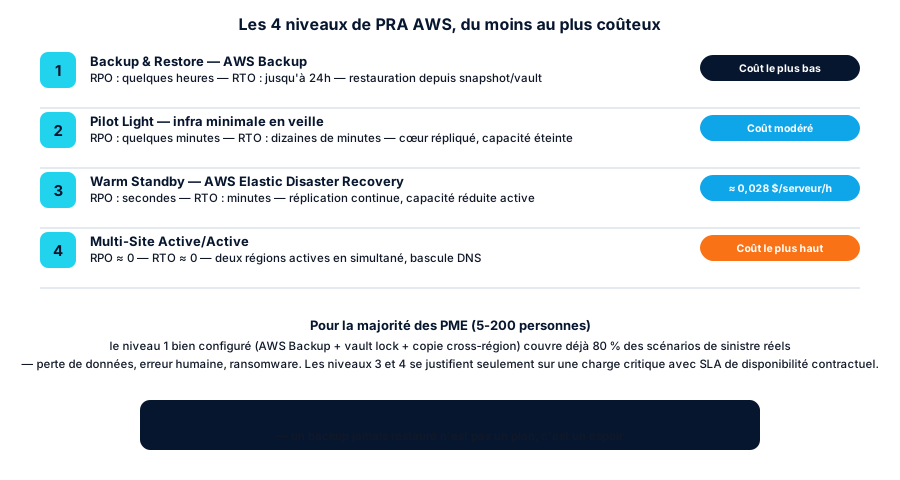
For the vast majority of organizations (5-200 people) without a contractual continuous-availability obligation, level 1 — Backup & Restore, properly configured — already covers most real-world scenarios: accidental deletion, deployment error, ransomware, compromised account. Levels 3 and 4 carry a permanent infrastructure cost (duplicated capacity running, even idle) that’s only justified if the business genuinely loses money every minute it’s down — a SaaS with a contractual SLA, a payment platform, a medical service.
AWS Backup: the minimum viable foundation
AWS Backup centralizes backup for most services (EBS, EFS, RDS, DynamoDB, Aurora, S3 since 2023) into a single managed service, with lifecycle and retention policies. Base pricing:
- Warm storage (immediate access): roughly $0.05/GB-month for EBS/EFS, $0.095/GB-month for RDS, $0.10/GB-month for DynamoDB.
- Cold storage (long retention): 70-80% cheaper than warm, but a 90-day minimum retention applies — any deletion before that is charged pro-rata for the remaining period.
- New low-cost tier for S3 (launched late 2025): roughly $0.035/GB-month after 60 days of warm retention, about 30% below the standard tier.
- Restore: roughly $0.02/GB for most resource types, $0.50 per request for individual file/object-level restores.
The minimum viable setup for an organization fits in three Terraform resources:
resource "aws_backup_vault" "main" {
  name = "prod-vault"
}

resource "aws_backup_plan" "prod" {
  name = "prod-daily"

  rule {
    rule_name         = "daily-backup"
    target_vault_name = aws_backup_vault.main.name
    schedule          = "cron(0 3 * * ? *)"

    lifecycle {
      cold_storage_after = 30
      delete_after        = 365
    }

    copy_action {
      destination_vault_arn = aws_backup_vault.dr.arn  # cross-region copy
      lifecycle {
        delete_after = 365
      }
    }
  }
}

resource "aws_backup_selection" "prod" {
  name         = "prod-resources"
  plan_id      = aws_backup_plan.prod.id
  iam_role_arn = aws_iam_role.backup.arn

  resources = ["arn:aws:rds:eu-west-3:*:db:*", "arn:aws:ec2:eu-west-3:*:volume/*"]
}
Three things are almost always missing in the configurations we audit:
- Cross-region copy is almost never enabled. A backup vault in the same region as production doesn’t protect against a regional failure — rare, but exactly the scenario a DR plan is supposed to cover.
- No Vault Lock. Without it, a compromised account (stolen admin credentials, ransomware with IAM access) can delete backups before encrypting production data — an increasingly common playbook.
- Restore has never been tested. A backup that’s never been restored in an isolated environment isn’t a validated plan — it’s an assumption.
Vault Lock and air-gapped vaults: ransomware protection
AWS Backup Vault Lock, in Compliance mode, makes recovery points immutable: retention can no longer be reduced, and no principal — including the root account — can delete a backup before it expires. This is the mechanism that breaks the classic ransomware playbook where an attacker, once inside the account, deletes backups before triggering encryption to force a ransom payment.
resource "aws_backup_vault_lock_configuration" "prod" {
  backup_vault_name = aws_backup_vault.main.name
  changeable_for_days = 3   # grace window before the lock becomes permanent
  min_retention_days  = 30
  max_retention_days  = 365
}
Compliance mode is irreversible once the grace window passes — the only way to lift it is to close the entire AWS account, which also deletes the backups. That’s a decision to make deliberately, not a box to check by default.
For even stronger isolation, AWS has offered the logically air-gapped vault since August 2024: copies are stored in an AWS-managed account, encrypted, locked by default, and shareable read-only via AWS Resource Access Manager for direct restore without depending on the source account. In July 2026, AWS extended this vault’s availability to six additional regions — a sign that a mechanism originally built for large regulated enterprises is becoming a standard accessible to organizations handling sensitive data too (health, finance, personal data).
Elastic Disaster Recovery: only when the RTO truly requires it
AWS Elastic Disaster Recovery (DRS) continuously replicates servers (on-prem or EC2) to an AWS region, with an RTO of a few minutes. The headline price is simple — $0.028/server/hour, roughly $20.44/server/month — but that’s misleading: it only covers the replication service itself. The real cost adds the EBS storage of replicated copies and staging compute, which typically make up two-thirds of the total. In AWS’s own 100-server example, the total monthly bill reaches roughly $6,389, or ~$64/server/month on average — three times the headline rate.
DRS has a genuine use case for organizations: migrating an on-prem workload to AWS with a short cutover window, or protecting a single critical workload (ERP, payment platform) that can’t tolerate several hours of downtime. But turning it on by default across the whole fleet “to be safe” means paying for a level-3 DR plan for a level-1 need. That’s the most common over-investment mistake we correct in audits — the exact mirror of the opposite mistake (no DR plan at all) that still dominates most organizations.
The minimum viable setup, concretely
For an organization of 5 to 200 people without a contractual continuous-availability requirement:
- AWS Backup on all stateful resources (RDS, EBS, DynamoDB, EFS), scheduled daily, 30 days warm retention then cold up to 1 year.
- Cross-region copy to a vault in a second AWS region — the marginal cost is low compared to the risk covered.
- Vault Lock in Compliance mode, with a 3-day grace window to validate the configuration before it locks permanently.
- A documented quarterly restore test — not in theory, an actual restore into an isolated account or VPC, with real time measured against the target RTO.
- DRS reserved for workloads where the economics justify it — compare the cost of an hour of downtime to the monthly cost of level 3 before extending it beyond the critical perimeter.
For a typical organization infrastructure (a few hundred GB to a few TB of stateful data), this foundation costs on the order of a few hundred euros a month — well below the cost of a single day of unplanned downtime for most businesses.
Conclusion
DR isn’t a topic you can delegate to a technical reflex — “we have snapshots” — without ever writing down the two numbers that matter: how much data can you afford to lose, how long can you afford to be down. Once those numbers are set, the choice between AWS Backup alone, Vault Lock, and Elastic Disaster Recovery becomes a straightforward economic calculation, not a question of abstract caution.
If your last tested restore was more than a year ago — or you can’t answer that question without checking — let’s talk about your architecture: a typical resilience audit takes 3 to 5 days and puts your infrastructure’s real RTO/RPO in writing, before any investment.
Found this useful? Share it.
Go further
A topic, a project, a question?
Distribuée supports demanding SMBs on cloud security, CI/CD supply chain and AI security.
Book 15 min